
Professional Gobo Projector: The Ultimate Guide for Stunning Light Displays
2026-10-20
Most people think a professional gobo projector is just a brighter version of the party lights they already own. They’re wrong. The gap between a mediocre wash and a crisp, museum-quality projection comes down to a handful of details that almost nobody talks about—lens quality, thermal management, gobo precision, and how the light actually behaves at a distance. Below, we skip the fluff and show you exactly what to look for, including why TNT has become a go-to name for designers who refuse to compromise on clarity.
Why Gobo Projectors Are Every Lighting Designer’s Secret Weapon
A gobo projector rarely gets top billing on a lighting plot, yet it quietly solves more staging problems than most flagship moving heads. Drop a steel or glass pattern into the gate and a flat wash becomes dappled forest light, a window frame, or a hard-edged corporate logo. That single trick means designers can paint texture across a set without adding physical scenery or burning an extra fixture just for breakup.
The real reason designers lean on these units is control. You can sharpen the pattern to read crisply on a cyc, or run it out of focus to melt into a soft abstract wash. Swapping a gobo takes seconds, and with a rotating holder a static leaf pattern suddenly feels like wind moving through branches. Glass gobos with color or gradients push it further, giving you a layered look from one compact source tucked in a corner.
Because they are small, cheap, and easy to hide, gobo projectors end up everywhere: tucked behind set pieces to fake a doorway shadow, aimed at a floor to suggest moonlight through blinds, or used as a subtle texture layer that keeps a blank stage from feeling dead. They don't shout for attention, and that's exactly why lighting designers keep reaching for them when a scene needs depth without clutter.
Picking a Projector That Won’t Let You Down Mid-Show
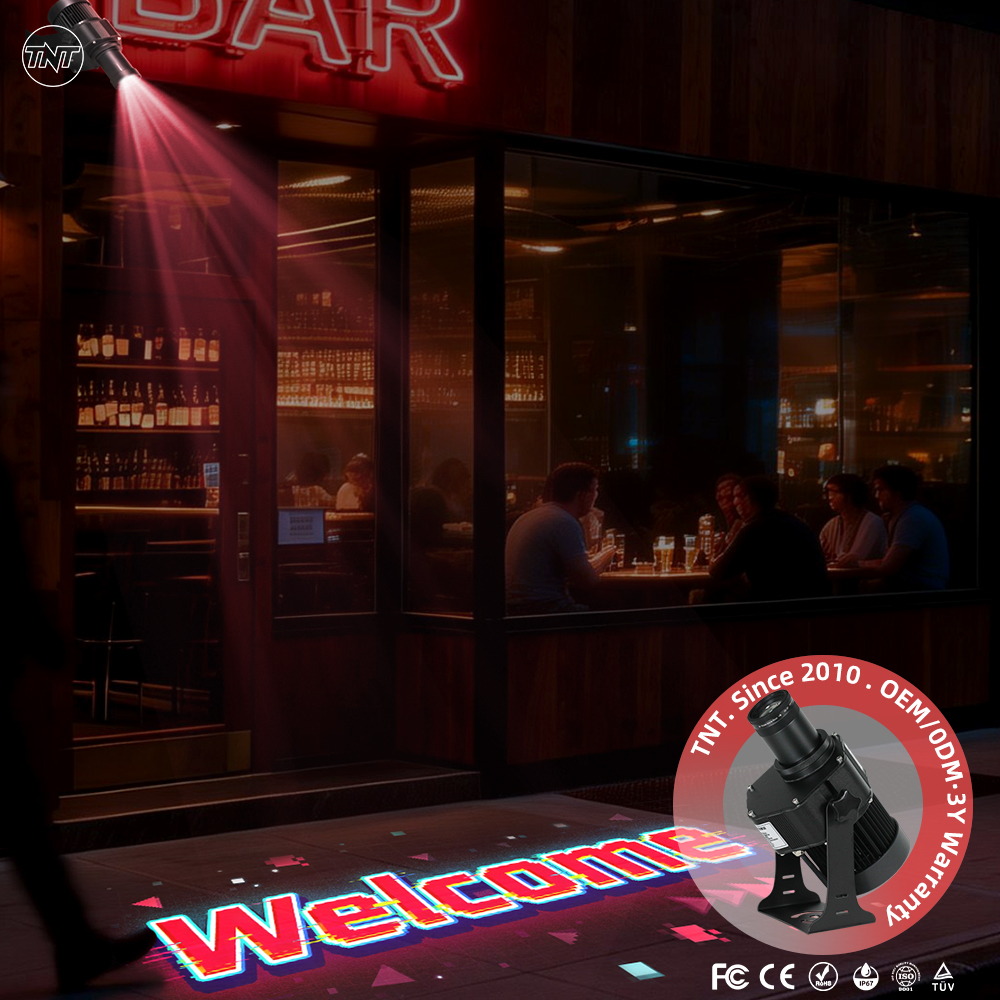
The moment a projector dies mid-set isn’t a tech hiccup—it’s a room full of people suddenly staring at a blank wall while you fumble with cables. The first thing to look for isn’t brightness or contrast; it’s how the unit handles heat and dust. Models with sealed optical engines or dual air filters tend to survive longer in cramped booth spaces, where a cheaper open-chassis design will choke within months. Ignore the spec-sheet wattage and instead check the fan noise at high altitude or after three hours of continuous use—many projectors quietly thermal-throttle, dimming the image 20% before they shut down entirely.
Redundancy matters more than raw specs. A projector with a hot-swappable lamp or a dual-laser module lets you swap the failing light source without killing the whole show. If you’re in a venue where downtime means refunds, look for models that support failover via HDMI loop-through or a secondary input that auto-switches when the primary signal drops. Also ask about the lamp’s rated life at full power, not eco mode—eco mode numbers are marketing, not the real runtime you’ll get at 100% brightness.
Finally, take the remote and menu system seriously. In a dark venue, a projector that forces you through five submenus to switch inputs or adjust keystone is a liability. The best live-event projectors have physical buttons for source, blank, and aspect ratio, plus a status light that tells you if it’s overheating before the image cuts out. Test the recovery time: after you pull the plug and plug it back in, does it come back in 10 seconds or 90? During a show, those 80 seconds feel like an eternity.
Mounting and Aiming Without the Usual Frustration
Most people expect mounting to be a quick two-minute job, then end up wrestling with tiny screws and uneven surfaces. The trick is to stop forcing a perfect fit from the start. Loosen everything just enough so the base can settle naturally, then tighten in a crossing pattern. That alone removes half the wobble and misalignment people blame on cheap hardware.
When it comes to aiming, rushing the first adjustment almost guarantees you'll chase the target back and forth. Pick a fixed reference point, make one deliberate move, then look away for a second. Your eyes need a reset or you'll overcorrect every time. Small, calm turns beat frantic spinning, and if the mount allows it, lock one axis before fine-tuning the other.
Once the base is solid and your adjustments are measured, the whole process stops feeling like guesswork. You'll notice the frustration disappears not because the gear got better, but because you stopped fighting it. A steady hand and a bit of patience turn a tedious setup into something you barely think about afterward.
Turning Logo Files Into Custom Gobos That Actually Look Right
The biggest mistake people make is sending a low-res JPEG pulled from a website and expecting it to etch cleanly onto a gobo. If your logo lives in a raster format, you’re already fighting an uphill battle. Vector files—AI, EPS, SVG, or even a sharp PDF—are non-negotiable because they hold their edges at any size. When you do have to work with a raster image, don’t just upscale it in Photoshop and hope for the best. Trace it manually or use a proper vectorization tool, then zoom in to 400% and clean up every wobbly curve. That’s the difference between a crisp projection and a blurry mess on the wall.
Beyond file type, you need to strip your logo down to what actually survives on a gobo. Thin hairlines under 1 point tend to disappear or break during etching, and drop shadows or gradients just turn into gray mush. Look at your design in pure black and white—no anti-aliasing, no soft edges. If a detail feels too delicate at business-card size, it’s probably too fragile for a gobo. Sometimes that means simplifying the mark: thickening strokes, removing small text, or opening up tight counters. This isn’t about butchering your brand; it’s about adapting it to the medium so it still reads instantly from across a room.
Finally, don’t assume the file that looks perfect on your monitor will behave the same once metal or glass gets involved. Ask your gobo vendor for a proof that shows the actual etched result, not just a digital mockup. A good shop will flag areas that might drop out or fill in, and they’ll often suggest a test run at the smallest size you plan to use. If you’re ordering multiple gobos with different logos, always request one physical sample first. That ten-dollar test gobo can save you from a hundred-dollar reorder and a projector throwing a logo that nobody recognizes.
Dialing In Brightness and Focus for Crisp, Vivid Projections
Getting the image right starts with understanding your room. Check how much ambient light falls on the screen during typical viewing hours. In a brighter space, push the projector’s luminance higher, but avoid maxing it out too early – you still need headroom for contrast. For dark home theaters, lower the lamp or laser power to deepen blacks without losing detail in shadowy scenes. A quick test: display a scene with both a bright sky and dark foliage, then adjust until neither area looks washed out or crushed.
Focus is rarely a set-and-forget step. Use a static test pattern with fine text or grid lines, then tweak the lens ring slowly – overshooting slightly and coming back often reveals the sharpest point. If your projector has digital keystone or lens shift, make physical placement adjustments first and use those controls sparingly, since heavy electronic correction can soften edges. For rooms where the projector sits off-center, lens shift keeps the image crisp without introducing soft corners.
Finally, remember that brightness and focus interact. A slightly defocused image can seem dimmer because fine details blur together. After setting brightness, recheck focus with a bright, high-contrast pattern. Some projectors have a “peaking” or edge enhancement option – if available, keep it low or off during initial calibration, as over-enhancement can create artificial halos around text and edges. Trust your eyes over preset modes; a few minutes of careful adjustment beats any out-of-the-box setting.
Keeping Your Unit Running Clean Through Hundreds of Hours
Most units don't fail suddenly after heavy use; they slowly lose their edge as grime builds up in places you rarely see. A thin layer of dust on intake vents can force the motor to work harder, while mineral deposits on internal components quietly reduce efficiency. Over hundreds of hours, that residue becomes baked on and far more difficult to remove, so regular wipe-downs save you from a tedious deep-scrub later.
For routine care, unplug the unit and use a slightly damp microfiber cloth on exterior surfaces. Warm water with a drop of mild dish soap handles most smudges, but stay away from abrasive sponges or strong solvents that can damage seals and finishes. If your model has a removable tray or reservoir, empty it after each use and let it air dry completely before reassembling—this single habit prevents most odor and mold issues.
Every couple of months, set aside twenty minutes for a deeper pass. Descale heating elements or humidifier chambers with a diluted vinegar solution or citric acid, then rinse thoroughly until no scent remains. Inspect filters for discoloration or brittleness and replace them before they become a bottleneck. Keep surrounding vents clear of clutter, and you'll notice the unit runs quieter and cooler, even after hundreds of hours on the clock.
FAQ
A professional unit uses a high-output LED or discharge lamp paired with precision optics, so the projected image stays crisp even at long throw distances. You get interchangeable lens barrels, metal or glass gobo support, and robust thermal management that keeps it running for hours without drift. Cheap party lights typically rely on plastic optics and low-power LEDs, which wash out beyond a few feet and can't hold a sharp focus.
Look at lumens first, but don't trust the marketing number alone; ask about measured output at the lens. A 60W LED projector can often out-throw a 100W fixture if the optics are better. Check the beam angle options and whether the lens is replaceable. For venues over 50 feet, you'll want a narrow beam barrel and at least 8,000 to 12,000 lumens. Also confirm the duty cycle and cooling system, because a projector that overheats after 30 minutes will ruin a live event.
Start with a high-contrast black-and-white version of the design. Fine lines below 0.5 mm tend to vanish in projection, so thicken them up. For metal gobos, send a vector file to a laser-cutting service; for glass gobos with grayscale or color, you need a high-resolution raster file at 300 dpi or better. Always ask for a test proof before ordering a full set, and remember that reversed text is often necessary if you're projecting through a lens from the front.
Mount it as perpendicular to the surface as possible. Even a 10-degree tilt will stretch the image and soften one edge, though keystone correction can help a little. For floor projections, a ceiling mount or tall truss works best. Keep the projector at a distance that matches the lens barrel's throw ratio; too close and the image is tiny and hot, too far and you lose brightness. Use masking tape on the surface to test framing before locking the fixture down.
Daylight gobo projection is possible, but it demands serious output. You need at least 15,000 to 20,000 lumens for bright sun, and the gobo should be a high-contrast metal type. Even then, the projection will look best in shade or on a light-colored surface. For dusk or nighttime events, a 60W to 100W LED projector is usually plenty. Always use a weatherproof housing and avoid pointing the lens directly at the sun to prevent internal damage.
First, power down the unit and let it cool completely. Use latex or cotton gloves because skin oils leave marks that bake onto the optics. Slide the gobo holder out gently; never force it if there's resistance. Clean the lens with a blower brush first, then a microfiber cloth and a drop of lens cleaner—never household glass spray. If the gobo itself is dusty, use compressed air rather than wiping it. Store unused gobos in individual sleeves to prevent scratching.
Absolutely. Try projecting a forest canopy pattern onto the ceiling of a retail store, or a city skyline silhouette down a restaurant hallway. Nightclubs use slow-rotating abstract gobos on haze to create a moving ceiling. One of my favorite tricks is projecting a subtle water ripple pattern onto a swimming pool from an overhead beam—it turns the whole surface into a living texture. Museums and galleries also use gobo projectors to highlight texture on sculptures without adding physical lighting instruments.
Blurry edges usually mean the projector is tilted relative to the surface, or you're using the wrong lens barrel for the throw distance. First, square up the fixture. If the blur remains, check whether the gobo is seated correctly in its holder; a slightly angled gobo will always soften one side. Also inspect the lens for condensation or dust buildup. In some cases, switching to a longer focal length lens and moving the projector farther back will flatten the image plane and restore edge-to-edge sharpness.
Conclusion
In live production, a gobo projector often becomes the quiet backbone of a lighting design—until it fails. The real secret isn't just having one, but knowing which unit will survive a bumpy load-in and a dusty venue. Reliable cooling, sturdy mounting hardware, and a lamp or LED module that holds color temperature over time matter more than raw lumen specs. When you mount it, leave room for fine adjustment; a projector that can't be re-aimed without loosening three bolts will eat into your soundcheck. Aiming is rarely a one-person job, so use a locking yoke or a safety cable that lets you tilt and pan without drifting.
Custom gobos often disappoint because the artwork wasn't prepared for light, not because the projector is weak. Convert logos to high-contrast black-and-white, keep fine lines thicker than they look on screen, and test with the actual lens before show day. Once the image is up, spend time on edge focus and hot-spot control—many designers chase brightness but end up with blown-out centers. A clean lens and an unobstructed gate make a bigger difference than cranking the dimmer. Finally, treat maintenance as a weekly ritual: blow out dust, inspect the cooling fan, and keep spare lamps labeled. A projector that runs clean through hundreds of hours isn't luck; it's a habit.
Contact Us
Contact Person: TNT SALE
Email: [email protected]
Tel/WhatsApp: 8613544277910
Website: https://www.tntprojector.com/